The Customer Portal offers a self-service solution to many common customer service and billing related tasks. The Customer Portal lets customers view history, update payment information, and more.
The Customer Portal allows your customers to:
- View their current and past invoices
- Make payments against open invoices
- View their balance
- View their current and past payments
- Update their payment information
The Customer Portal can also be extended and customized - embed your own logo, your own contact information, change colors via developer-friendly CSS/stylesheet overrides, and more.
To enable the Customer Portal:
- Go to Features & Add-Ons > Browse All Features.
- Find Customer Portal and click Get Started.
- Set Enable the Customer Portal to Yes.
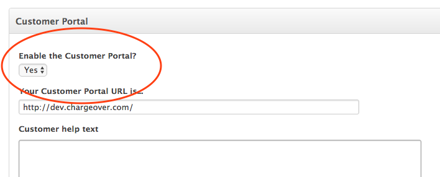
You will now see the URL for your Customer Portal and have the option to specify what information is displayed to customers
Customers log in to the Customer Portal using their email address (the email address you see in ChargeOver) and a password.
If the customer does not know the password:
- You can set the password for them by editing their contact information, which lets you change their password.
- Alternately, they can click Don't have an account? Get one! on the Customer Portal login page.
- Passwords can be randomly generated and emailed to them when you enter them into ChargeOver.
Note: We do not offer refunds for late cancellations. Click the link below and follow the instructions prior to February 28, 2021 if you wish to cancel your subscription. It is each license holder's responsibility to update their card details or auto-payment selection prior to renewal, and to hand-over this responsibility and license to someone else in their company if they leave, or to cancel your subscription via your online account or by emailing us at sales@johngalt.com prior to renewal. We are not responsible for any failure to adequately hand-over active subscriptions, auto-payments or licenses - including any failure to re-direct an email address so that your company receives these renewal reminder notices.
Comments
0 comments
Please sign in to leave a comment.