The Brown's Double Simple Exponential Smoothing method attempts to create a linear equation. It performs two simple exponential smoothing forecasts and then adjusts for the linear trend in the data. It is similar to Double Exponential Smoothing in the fact that the goal is to create a linear trend, but it does so without adding additional parameters to the equation. Since forecasts can be expressed as a function of the single and double smoothed constants, the procedure is known as Double Exponential Smoothing.
Brown's Double Exponential Smoothing is appropriate for data that shows a linear trend over time. The smoothing component is level.
To use the Double Brown Exponential Smoothing forecasting technique:
- Click the Forecast Method tab.
- From the Forecast Technique menu, scroll through the list of methods and select Double Exponential Smoothing Brown. The Double Exponential Smoothing Forecasting technique appears.
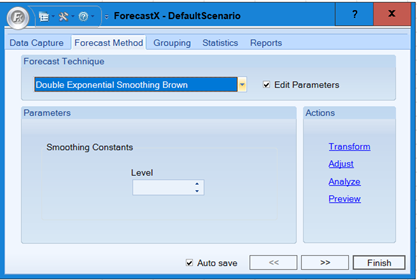
- Enable the Edit Parameters checkbox to activate the parameters.
- In the Smoothing Constants section, enter the number of levels to use in the forecast.
- Click Finish. The results display a linear trend over time.
Comments
0 comments
Please sign in to leave a comment.