ForecastX™ enables you to select statistical analyses to include on the reports. ForecastX supports more than 40 statistics. ForecastX supports three categories of statistics:
- Accuracy
- Analysis
- Regression
The Advanced Statistics window offers advanced statistics for experienced statisticians. The matrix level statistics and the statistics for Regression Model are also located in the Advanced Statistics area. When a Regression method is selected, the P-Value option is automatically chosen on the Statistics tab. To access the Advanced Statistics, click More Statistics on the Statistics tab. For additional information on statistics, see the Statistics section.
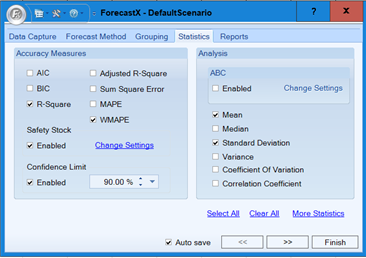
The depiction below is the Statistics window.
ABC Analysis
ABC Analysis will allow you to determine which SKUs, customers, or regions represent the majority of your business.
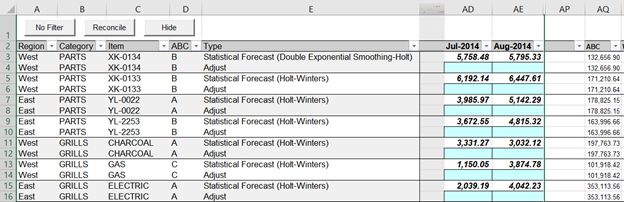
ABC Analysis is presented as an additional statistic associated with each series. It can be added to selected reports.
To configure and use the ABC Analysis feature:
- Open an Excel sheet with time series data.
- Click in a cell containing data and open the ForecastX by clicking
 . ForecastX appears.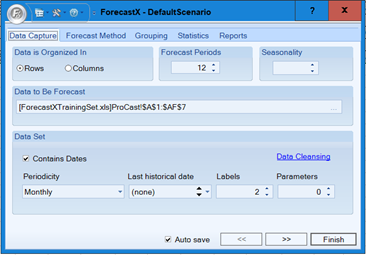
- Click the Statistics tab. Once you are there, click More Statistics on the lower right-hand side of the screen.
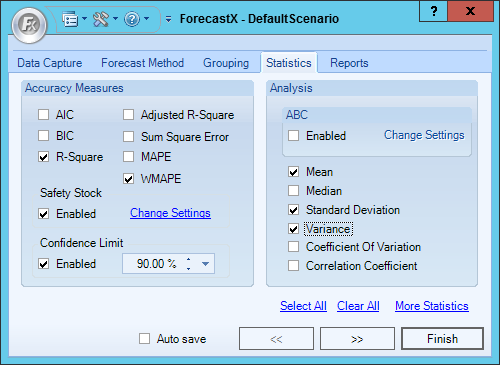
- Enable the Enabled checkbox in the ABC section and click Change Settings. The window displays break points that total 100%.
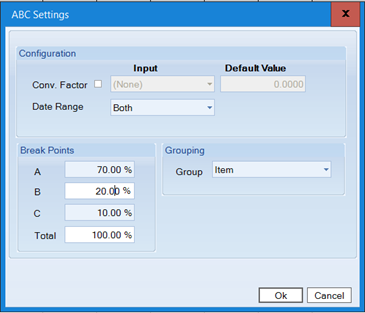
Option Description Conv. Factor A per-unit currency value used to convert units to dollars. Specify values for each series by mapping a parameter from your data set (Input) or enter a single value for all series (Default Value). Uses the same behavior that is used in the Conversion Factor. Date Range Select the Historical date range, the Forecast date range, or Both (all). Break Points Select break points for the analysis. Most users select A: 70%, B: 20%, and C: 10%. You can change values for each analysis by. Grouping Specify a grouping to perform the analysis at that level. - The results appear in selected reports under a new column with the ABC Breakdown.
Comments
0 comments
Please sign in to leave a comment.